










Κάνε genderize τα ονόματα αποστολέων email στο Gmail
Εμπλούτισε τα εισερχόμενά σου με δεδομένα φύλου
Το Gmail είναι μία από τις πιο δημοφιλείς πλατφόρμες email παγκοσμίως, διαχειριζόμενη δισεκατομμύρια μηνύματα κάθε μέρα. Ενσωματώνοντας το Gender-API στο Gmail, μπορείς να αναλύεις αυτόματα τα ονόματα των αποστολέων και να εμπλουτίζεις τη βάση δεδομένων των επαφών σου με πληροφορίες gender.
Προσδιορίζοντας αυτόματα το φύλο των αποστολέων email, μπορείς να προσωποποιείς τις απαντήσεις σου, να οργανώνεις καλύτερα τις επαφές σου και να αποκτάς δημογραφικές πληροφορίες για τα μοτίβα επικοινωνίας σου.
Γιατί να ενσωματώσεις το Gender-API με το Gmail;
- Αυτόματη ανάλυση: Προσδιόρισε αυτόματα το φύλο από τα ονόματα αποστολέων email.
- Εμπλουτισμός επαφών: Εμπλούτισε τις επαφές σου στο Gmail με δημογραφικές πληροφορίες.
- Καλύτερη οργάνωση: Επισήμανε και κατηγοριοποίησε τα email με βάση τα δημογραφικά στοιχεία του αποστολέα.
- Πληροφορίες πωλήσεων: Δημιούργησε προφίλ υποψήφιων πελατών με επιπλέον πληροφορίες και πλαίσιο.
Πώς λειτουργεί
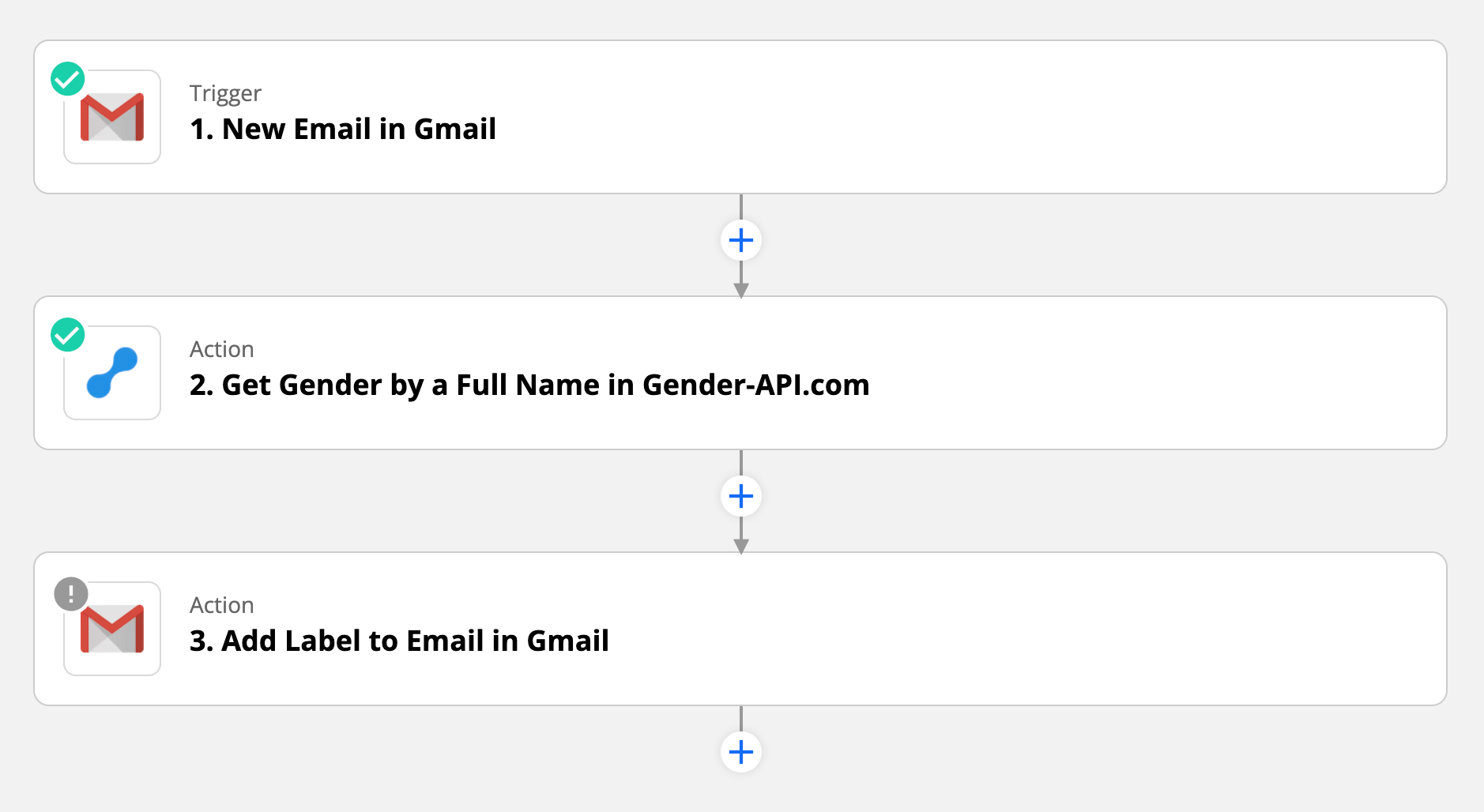
Η ενσωμάτωση χρησιμοποιεί το Zapier για να συνδέσεις το Gmail με το Gender-API. Μπορείς να ρυθμίσεις triggers με βάση συγκεκριμένα κριτήρια, όπως email από συγκεκριμένους αποστολείς, email με συγκεκριμένες ετικέτες ή όλα τα εισερχόμενα email.
1. Ενεργοποίηση & Εξαγωγή
Όταν ενεργοποιείται ένα trigger (π.χ. νέο email), το Zapier εξάγει το όνομα του αποστολέα από την κεφαλίδα του email και το στέλνει στο Gender-API για ανάλυση.
2. Εμπλουτισμός & Ενέργεια
Το Gender-API επιστρέφει το φύλο και το σκορ αξιοπιστίας. Αυτά τα δεδομένα μπορούν να προστεθούν αυτόματα σε ένα Google Sheet, να σταλούν στο CRM σου, να προστεθούν ως ετικέτα στο Gmail ή να αποθηκευτούν στις σημειώσεις επαφών.
Περιπτώσεις χρήσης
- Ομάδες Πωλήσεων: Εμπλούτισε τα στοιχεία των υποψήφιων πελατών από cold emails.
- Υπεύθυνοι προσλήψεων: Δημιούργησε προφίλ υποψηφίων από τις αιτήσεις.
- Υποστήριξη: Εξατομίκευσε τις απαντήσεις με τις σωστές προσφωνήσεις.
- Διοργανωτές Εκδηλώσεων: Ανάλυσε τα δημογραφικά στοιχεία των αιτημάτων.
- Biz Dev: Παρακολούθησε τα μοτίβα επικοινωνίας.
- Έρευνα αγοράς: Συγκέντρωσε πληροφορίες για το κοινό σου.
Χαρακτηριστικά ενσωμάτωσης
Προηγμένος αυτοματισμός
- Ευέλικτες ενεργοποιήσεις (ετικέτες, αποστολείς, λέξεις-κλειδιά)
- Ροές εργασίας με πολλαπλές ενέργειες
- Αυτοματισμοί με βάση τις ετικέτες
Ασφαλές & έξυπνο
- Λογική υπό όρους με βάση τους δείκτες αξιοπιστίας
- Ιστορική επεξεργασία μέσω αναζήτησης
- Με έμφαση στο απόρρητο: Επεξεργάζεται μόνο ονόματα
Έτοιμος/η να αναβαθμίσεις τα εισερχόμενά σου;
Ξεκίνα τη ροή εργασίας ενσωμάτωσηςΣυχνές ερωτήσεις
Αυτή η ενσωμάτωση διαβάζει το περιεχόμενο των email μου;
Όχι. Η ενσωμάτωση αποκτά πρόσβαση μόνο στο όνομα του αποστολέα από τις κεφαλίδες των email. Το περιεχόμενο του email παραμένει ιδιωτικό, δεν αποστέλλεται ποτέ στο Gender-API και δεν επεξεργάζεται από το workflow. Επεξεργαζόμαστε αυστηρά μόνο το δημόσια ορατό όνομα αποστολέα για τον εντοπισμό φύλου.
Μπορώ να επεξεργαστώ email αναδρομικά;
Ναι. Μπορείς να χρησιμοποιήσεις τη λειτουργία αναζήτησης του Gmail στο Zapier για να βρεις και να επεξεργαστείς υπάρχοντα email με βάση συγκεκριμένα κριτήρια. Έτσι μπορείς να εμπλουτίσεις τα ιστορικά σου δεδομένα email με πληροφορίες για το φύλο. Ωστόσο, πρόσεξε τα όρια χρήσης του API όταν επεξεργάζεσαι μεγάλους όγκους δεδομένων.
Τι γίνεται αν ο αποστολέας χρησιμοποιεί μόνο μια διεύθυνση email;
Αν ο αποστολέας του email δεν έχει ορίσει εμφανιζόμενο όνομα, η ροή εργασίας θα προσπαθήσει να εξαγάγει ένα όνομα από την ίδια τη διεύθυνση email. Αν δεν μπορεί να αναγνωριστεί όνομα, μπορείς να ρυθμίσεις τη ροή εργασίας ώστε να παραλείπει την επεξεργασία ή να επισημαίνει την εγγραφή ως «Άγνωστο».
Μπορώ να το χρησιμοποιήσω με το Google Workspace (παλιότερα G Suite);
Φυσικά! Η ενσωμάτωση λειτουργεί τόσο με προσωπικούς λογαριασμούς Gmail όσο και με λογαριασμούς Google Workspace. Αυτό το κάνει ιδανικό για επαγγελματικές ομάδες που θέλουν να εμπλουτίσουν τα στοιχεία επαφών από την επαγγελματική τους email επικοινωνία.
Είναι αυτό σύμφωνο με τους όρους χρήσης του Gmail;
Ναι, όταν ρυθμιστεί μέσω του Zapier με τις σωστές άδειες OAuth, αυτή η ενσωμάτωση συμμορφώνεται με τους όρους του Gmail API. Η ενσωμάτωση έχει πρόσβαση μόνο σε πληροφορίες κεφαλίδας (ονόματα αποστολέων) και δεν διαβάζει, δεν τροποποιεί ούτε αποθηκεύει το περιεχόμενο των email.
Έχεις απορίες;
