










Klaviyo के लिए Gender-API इंटीग्रेशन
अपने मार्केटिंग को हाइपर-पर्सनलाइज़ करो
Klaviyo ईकॉमर्स के लिए अग्रणी ग्रोथ मार्केटिंग प्लेटफ़ॉर्म है। Gender-API को इंटीग्रेट करके तुम कस्टमर प्रोफाइल्स को सटीक gender डेटा से एनरिच कर सकते हो, ताकि सुपर पर्सनलाइज़्ड ईमेल और SMS कैंपेन चलाकर बेहतर नतीजे पा सको।
अपने ग्राहक का gender जानकर तुम उनके लिए सही प्रोडक्ट्स सुझा सकते हो, कंटेंट को उनके मुताबिक पर्सनलाइज़ कर सकते हो, और ऑडियंस को सटीक तरीके से सेगमेंट कर सकते हो—जिससे एंगेजमेंट और कन्वर्ज़न रेट दोनों बढ़ते हैं।
Klaviyo ke saath Gender-API ko sammelit (integrate) kyun karein?
- स्वचालित डेटा समृद्धि: नए प्रोफ़ाइल्स अपने-आप ऑटोमैटिकली अपडेट करो।
- व्यक्तिगत कंटेंट: लिंग-विशेष उत्पाद और ऑफ़र दिखाएँ।
- स्मार्ट सेगमेंटेशन: बेहतर ROI के लिए टारगेटेड ऑडियंस बनाओ।
- ऑम्नीचैनल: ईमेल और SMS में जेंडर डेटा का इस्तेमाल करो।
यह कैसे काम करता है
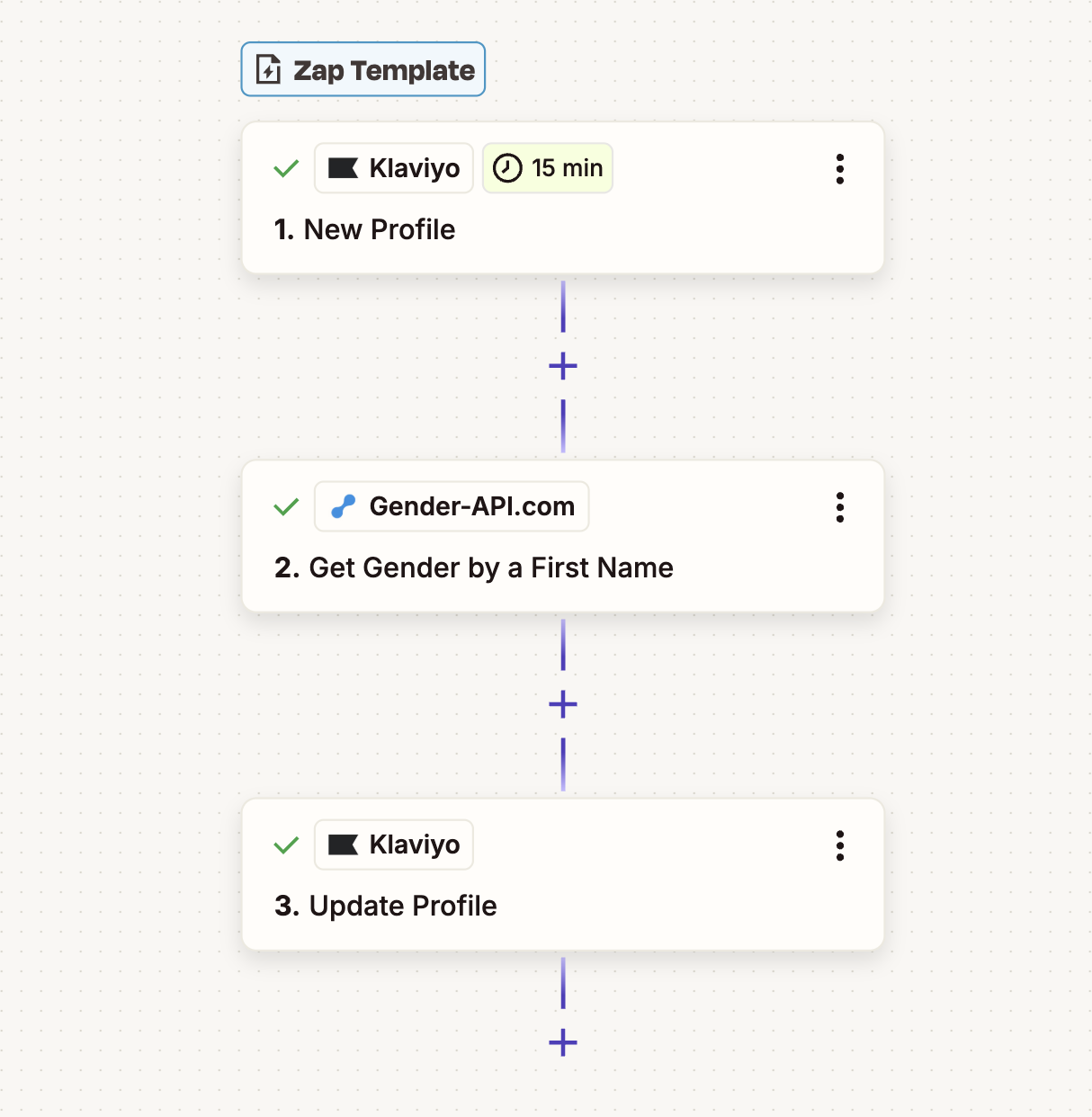
यह इंटीग्रेशन Zapier द्वारा संचालित है और बैकग्राउंड में काम करता है। जैसे ही कोई ग्राहक तुम्हारी लिस्ट में जुड़ता है, उसका डेटा अपने-आप एनरिच हो जाता है।
1. नया प्रोफ़ाइल
जब Klaviyo में नया कस्टमर प्रोफ़ाइल बनता है (साइनअप या खरीदारी के ज़रिए), Zapier ऑटोमैटिकली वर्कफ़्लो ट्रिगर करता है और पहला नाम Gender-API को भेज देता है।
2. प्रोफ़ाइल को बेहतर बनाओ
Gender-API तुम्हें gender और confidence score वापस देता है। ये डेटा Klaviyo प्रोफ़ाइल में एक custom property के तौर पर जोड़ दिया जाता है, ताकि तुम इसे flows और segments में तुरंत इस्तेमाल कर सको।
उपयोग के मामले
- फ़ैशन: पुरुषों बनाम महिलाओं के कलेक्शन्स सुझाओ।
- सुंदरता: जेंडर-विशिष्ट प्रोडक्ट्स की सिफ़ारिश करो।
- गिफ्टिंग: सही और उपयोगी गिफ्ट गाइड्स क्यूरेट करो।
- फिटनेस: वर्कआउट प्लान्स को अपनी पसंद के मुताबिक कस्टमाइज़ करो।
- SMS: वैयक्तिकृत टेक्स्ट ऑफ़र भेजो।
- Welcome Flows: पहली छाप को अपने हिसाब से तैयार करो।
इंटीग्रेशन फीचर्स
मार्केटिंग फीचर्स
- कस्टम प्रॉपर्टी सपोर्ट
- फ़्लो ट्रिगर्स सक्षम किए गए
- Dynamic content तैयार है
विश्वसनीयता
- उच्च सटीकता वाला वैश्विक डेटा
- विश्वसनीयता स्कोरिंग
- GDPR के अनुरूप
अपने ईकॉमर्स मार्केटिंग को अपग्रेड करने के लिए तैयार हो?
इंटीग्रेशन शुरू करेंअक्सर पूछे जाने वाले प्रश्न
मैं इसे ईमेल टेम्पलेट्स में कैसे इस्तेमाल करूँ?
कस्टम प्रॉपर्टी "Gender" के आधार पर डायनेमिक वेरिएबल्स (जैसे, {{ person|lookup:"Gender" }}) इस्तेमाल करो या कंटेंट ब्लॉक्स को दिखाओ/छुपाओ।
क्या मैं मौजूदा प्रोफ़ाइलों को और समृद्ध कर सकता/सकती हूँ?
हाँ। प्रोफ़ाइल्स एक्सपोर्ट करो, उन्हें Gender-API के ज़रिए प्रोसेस करो, और फिर दोबारा इम्पोर्ट कर लो। या फिर “Profile Updated” ट्रिगर इस्तेमाल करके समय के साथ धीरे-धीरे डेटा को एनरिच करते रहो।
क्या ये SMS के साथ काम करता है?
हाँ! डेटा प्रोफ़ाइल में ही सेव रहता है, इसलिए ये Email, SMS और Push समेत सभी Klaviyo चैनलों में एक्सेस किया जा सकता है।
अस्पष्ट (Ambiguous) नामों का क्या?
Ham ātmavishvās ank ko pradaan karāte hain. Aap uchch ātmavishvās hone par hi gendr nirdhārit karne ka vikalp chune saktē hain, athavā surakṣa ke liye “ajān̄t” ke roop mein nishchit kar sakate hain.
Kyā yah anuroop hai?
Haan, pehale nām ke ādhār par gendr anusmāran ka prayoga vyaktigatīkarana ke liye āmn̄ya hai (GDPR/CCPA) jab jitnā jān̄karī se prayoga kare.
कोई भी प्रश्न है?
