










Mailchimp के लिए Gender-API इंटीग्रेशन
अपने ईमेल मार्केटिंग को पर्सनलाइज़ करो
Mailchimp एक अग्रणी मार्केटिंग ऑटोमेशन प्लेटफ़ॉर्म है। Gender-API को इंटीग्रेट करके तुम अपने ईमेल मार्केटिंग को बदल सकते हो—ऑटोमैटिक gender डिटेक्शन के ज़रिए बड़े पैमाने पर पर्सनलाइज़्ड कम्युनिकेशन संभव होता है।
यह इंटीग्रेशन सही भाषा और मैसेजिंग के साथ हर सब्सक्राइबर से सीधे जुड़ने वाला कंटेंट भेजकर ओपन रेट, क्लिक-थ्रू रेट और कुल मिलाकर कैंपेन परफॉर्मेंस को बेहतर बनाने में मदद करता है।
Gender-API को Mailchimp के साथ एकीकृत क्यों करें?
- स्वचालित एनरिचमेंट: नए और मौजूदा सब्सक्राइबर्स में तुरंत जेंडर डेटा जोड़ो।
- उन्नत सेगमेंटेशन: टार्गेटेड कैंपेन्स के लिए जेंडर-आधारित ऑडियंस सेगमेंट्स बनाओ।
- बेहतर जुड़ाव: व्यक्तिगत शुभकामनाएँ और कंटेंट ओपन रेट बढ़ाते हैं।
- बेहतर कन्वर्ज़न: लिंग-विशिष्ट प्रोडक्ट सिफारिशें ज़्यादा बिक्री बढ़ाती हैं।
यह कैसे काम करता है
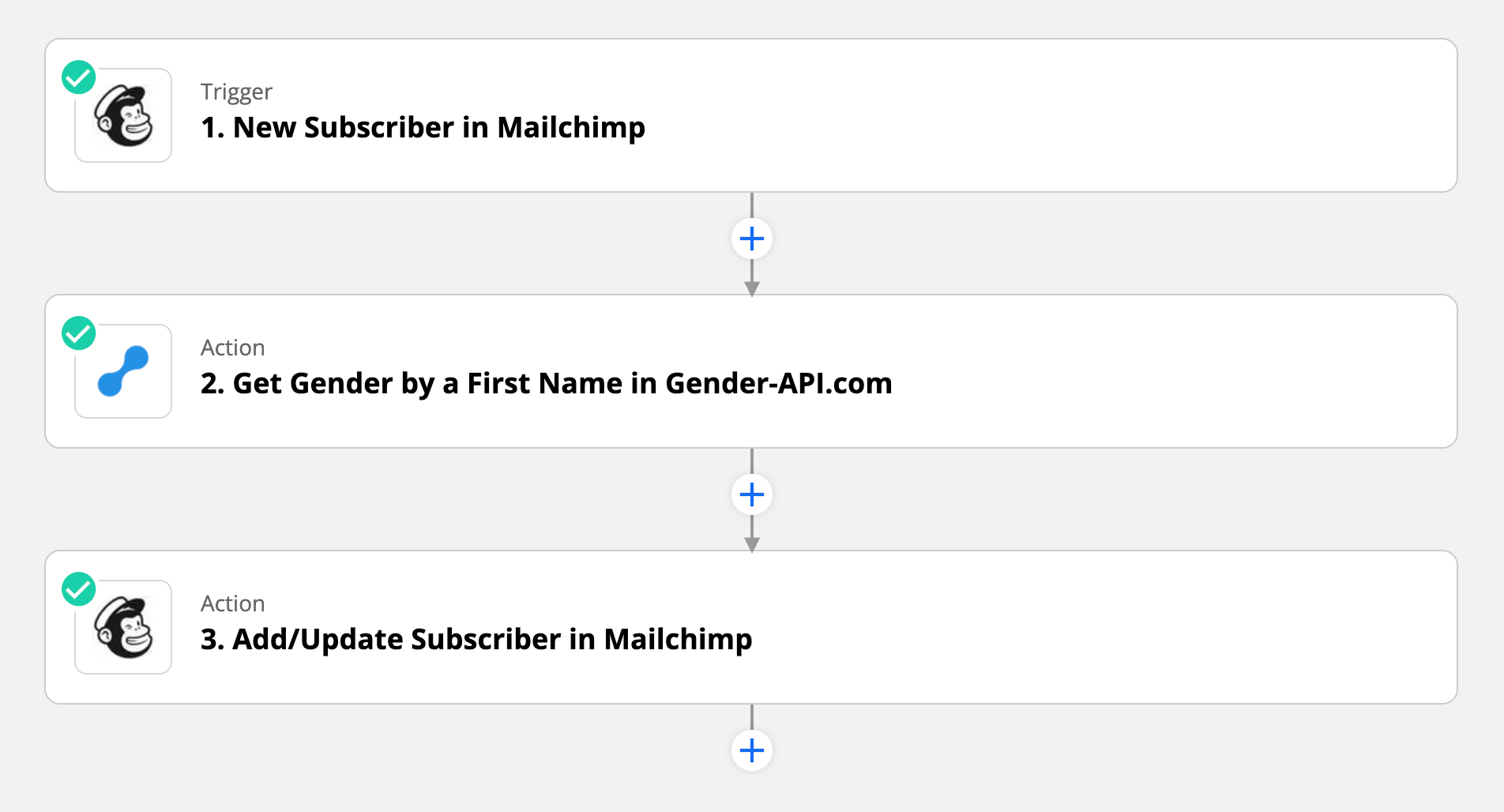
यह इंटीग्रेशन Zapier के ज़रिए बिलकुल बिना रुकावट के काम करता है। जैसे ही तुम्हारी Mailchimp लिस्ट में कोई नया सब्सक्राइबर जुड़ता है, अपने-आप एक ऑटोमैटिक डेटा-एनरिचमेंट वर्कफ़्लो ट्रिगर हो जाता है।
1. नया सब्सक्राइबर
जब तुम्हारी Mailchimp लिस्ट में कोई नया सब्सक्राइबर जुड़ता है, Zapier वर्कफ़्लो ट्रिगर करता है और पहले नाम को विश्लेषण के लिए Gender-API पर भेज देता है।
2. प्रोफ़ाइल को बेहतर बनाओ
Gender-API तुम्हें gender और confidence score वापस देता है। यह डेटा अपने-आप subscriber के प्रोफ़ाइल में custom merge field या tag के रूप में जोड़ दिया जाता है।
उपयोग के मामले
- फैशन रिटेल: जेंडर के हिसाब से सही प्रोडक्ट रिकमेंडेशन।
- E-learning: कोर्स की सिफ़ारिशों को अपने हिसाब से पर्सनलाइज़ करो।
- स्वास्थ्य और वेलनेस: आपके लिए चुनिंदा स्वास्थ्य सुझाव।
- इवेंट्स: सही उपाधियों के साथ निमंत्रणों को अपनी पसंद के अनुसार कस्टमाइज़ करो।
- B2B: बिक्री आउटरीच कैंपेन को पर्सनलाइज़ करो।
- गैर-लाभकारी संस्थाएँ: दाताओं की सहभागिता बेहतर बनाओ।
इंटीग्रेशन फीचर्स
मार्केटिंग ऑटोमेशन
- रीयल-टाइम सब्सक्राइबर प्रोसेसिंग
- टैग-आधारित वर्कफ़्लो ऑटोमेशन
- कस्टम फ़ील्ड मैपिंग
डेटा की सटीकता
- 178 देशों में सटीक
- कॉन्फिडेंस स्कोरिंग फ़िल्टर
- मल्टी-लिस्ट सपोर्ट
अपनी ईमेल मार्केटिंग को अपग्रेड करने के लिए तैयार हो?
इंटीग्रेशन शुरू करेंअक्सर पूछे जाने वाले प्रश्न
मैं अपनी मार्केटिंग कैंपेन्स में जेंडर डेटा का इस्तेमाल कैसे करूँ?
अपने ईमेल टेम्प्लेट्स में merge tag के रूप में gender डेटा इस्तेमाल करो (जैसे, *|GENDER|*), gender के आधार पर सेगमेंट बनाओ, या conditional content blocks का उपयोग करके अलग-अलग gender वाले लोगों को अलग कंटेंट दिखाओ।
क्या मैं मौजूदा सब्सक्राइबर्स को एनरिच कर सकता/सकती हूँ?
हाँ! अपनी लिस्ट एक्सपोर्ट करो, उसे Gender-API (CSV या API) के ज़रिए प्रोसेस करो, और फिर दोबारा इम्पोर्ट कर लो। या फिर “Updated Subscriber” पर ट्रिगर होने वाला एक Zap सेटअप करो, ताकि तुम अपनी मौजूदा लिस्ट को धीरे-धीरे एनरिच कर सको।
जेंडर-न्यूट्रल नामों का क्या?
Gender-API तुम्हें एक confidence score देता है। तुम अपना workflow ऐसे configure कर सकते हो कि gender tags सिर्फ तब ही लागू हों जब confidence किसी तय threshold से ऊपर हो—जिससे data quality हमेशा high बनी रहे।
क्या यह ग्रुप्स और सेगमेंट्स के साथ काम करता है?
बिलकुल! तुम gender डेटा का इस्तेमाल करके सेगमेंट बना सकते हो, उसे ग्रुप्स पर लागू कर सकते हो, या फिर किसी भी दूसरे Mailchimp फीचर में इस्तेमाल करके एडवांस्ड टार्गेटिंग स्ट्रैटेजीज़ तैयार कर सकते हो।
क्या यह ईमेल नियमों/विनियमों के मुताबिक है?
हाँ, पहले नामों से gender का अनुमान लगाना GDPR, CAN-SPAM और दूसरे नियमों के मुताबिक है—जब तुम इसे personalization के लिए इस्तेमाल करते हो। डेटा को सुरक्षित तरीके से प्रोसेस किया जाता है और उसे स्थायी रूप से स्टोर नहीं किया जाता।
कोई भी प्रश्न है?
