










Genderize Email Sender Names in Gmail
Enrich Your Inbox with Gender Data
Gmail is one of the most widely used email platforms globally, handling billions of messages daily. Integrating Gender-API with Gmail allows you to automatically analyze sender names and enrich your contact database with gender information.
By automatically determining the gender of email senders, you can personalize responses, better organize contacts, and gain demographic insights about your communication patterns.
Why Integrate Gender-API with Gmail?
- Automatic Analysis: Determine gender from email sender names automatically.
- Contact Enrichment: Enhance your Gmail contacts with demographic information.
- Better Organization: Label and categorize emails based on sender demographics.
- Sales Intelligence: Build prospect profiles with additional context.
How It Works
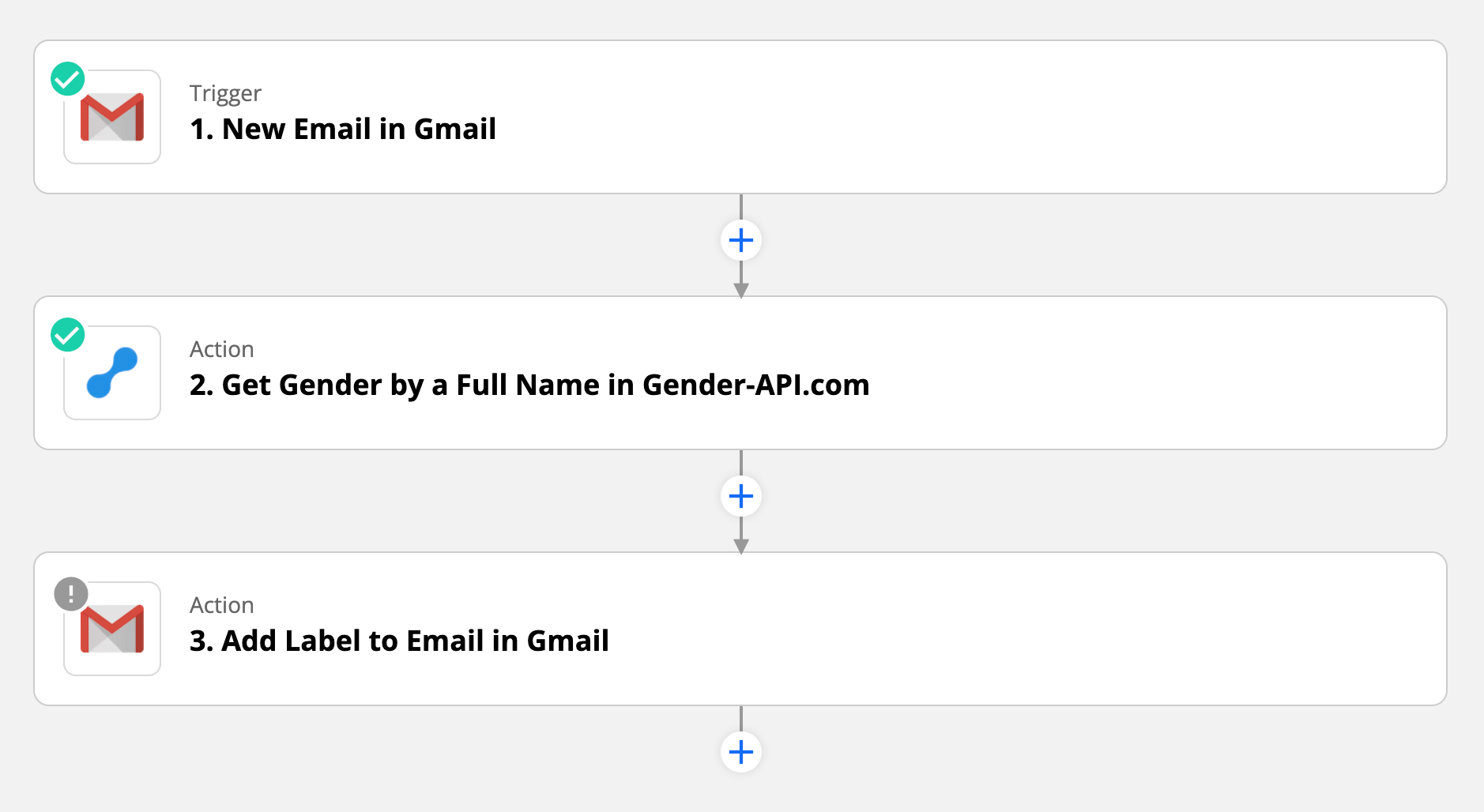
The integration uses Zapier to connect Gmail with Gender-API. You can set up triggers based on specific criteria, such as emails from certain senders, emails with specific labels, or all incoming emails.
1. Trigger & Extract
When a trigger fires (e.g., new email), Zapier extracts the sender's name from the email header and sends it to Gender-API for analysis.
2. Enrich & Action
Gender-API returns the gender and confidence score. This data can be automatically added to a Google Sheet, sent to your CRM, added as a Gmail label, or stored in contact notes.
Use Cases
- Sales Teams: Enrich prospect info from cold emails.
- Recruiters: Build candidate profiles from applications.
- Support: Personalize responses with correct salutations.
- Event Organizers: Analyze inquiry demographics.
- Biz Dev: Track communication patterns.
- Market Research: Gather audience insights.
Integration Features
Advanced Automation
- Flexible triggers (labels, senders, keywords)
- Multi-action workflows
- Label-based automation
Secure & Smart
- Conditional logic based on confidence scores
- Historical processing via search
- Privacy-focused: Only processes names
Ready to upgrade your inbox?
Start Integration WorkflowFrequently Asked Questions
Does this integration read my email content?
No. The integration only accesses sender name information from email headers. Email content remains private and is never sent to Gender-API or processed by the workflow. We strictly process only the publicly visible sender name for gender detection.
Can I process emails retroactively?
Yes. You can use Gmail's search functionality in Zapier to find and process existing emails based on specific criteria. This allows you to enrich your historical email data with gender information. However, be mindful of your API usage limits when processing large volumes.
What happens if the sender uses only an email address?
If the email sender has not configured a display name, the workflow will attempt to extract a name from the email address itself. If no name can be identified, the workflow can be configured to skip processing or mark the record as "Unknown".
Can I use this with Google Workspace (formerly G Suite)?
Absolutely! The integration works with both personal Gmail accounts and Google Workspace accounts. This makes it ideal for business teams who want to enrich contact data from their professional email communications.
Is this compliant with Gmail's terms?
Yes, when configured through Zapier with proper OAuth permissions, this integration complies with Gmail's API terms. The integration only accesses header information (sender names) and does not read, modify, or store email content.
Have any questions?
