






Bulk gender lookup: from ten thousand names to 10,000,000
Upload the file or call the API. Either way you know the price before you start, every row comes back with the evidence behind it, and your spreadsheet comes back as your spreadsheet.
The short answer
- Up to 10,000,000 rows in one CSV, 300,000 in one Excel workbook, or 100 names per API request with no ceiling on the number of requests.
- One lookup is one credit, bought in advance — from €0.35 per 1,000 names. You know the price of the whole job before you start it, on a VAT invoice, and credits are valid for 12 months from your last purchase.
- Your workbook is returned, not replaced: styles, dates, formulas, merged cells and the other worksheets all survive. The new columns are merged in beside your data.
- Every row carries a probability and a sample count, so you can accept the confident rows automatically and send only the rest to review.
Two ways to do it, and how to choose
A one-off clean-up and a continuously enriched database are different jobs. The same data answers both, but you should not use the same route for both.
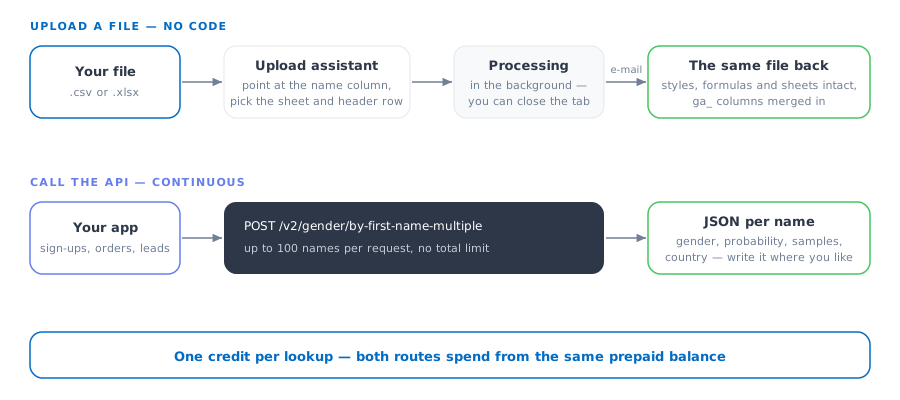
| Question | Upload a file | Call the API |
|---|---|---|
| Best for | A list you have now — a CRM export, an event registration list, a mailing list | Names arriving continuously — sign-ups, orders, imported leads |
| Who does it | Anyone who has the file. No code. | A developer, once — then it runs itself |
| Size limit | 10,000,000 rows per CSV, 300,000 per Excel workbook | 100 names per request, no total limit |
| What you get back | The same file, with new columns merged in | JSON per name, to write wherever you want it |
| Telling it the country | Assign a country column in the wizard | A country, locale or IP address per name |
| While it runs | Processing continues in the background; you get an e-mail with the download link when it is done | Synchronous — one request, one answer |
| Cost | Identical. One credit per lookup either way, from the same balance. | |
What a large job actually costs
Priced per lookup, not per seat and not per month. One name resolved is one credit, whether it went through a file or the API, and the rate improves as the volume rises.
| Names | Cheapest published package that covers it, net |
|---|---|
| 10,000 | €16.99 |
| 100,000 | €99.00 |
| 500,000 | €299 |
| 10,000,000 | ask us for a quote |
Two things worth doing before you buy, because both reduce what you pay: de-duplicate the list — the same first name twice costs two credits — and strip the rows you do not actually need gendered. A name you never send is free, and on a real customer export those two steps often remove a surprising share of the file.
Current figures, all tiers and the subscription option are on the pricing page. Larger than the largest published package? Ask us — that is an ordinary conversation, not a special case.
Your spreadsheet comes back as a spreadsheet
This is the part that is usually done badly, so it is worth being specific. We do not read your data out, gender it and hand you a new file. We open your workbook, write the new columns into it and give it back.
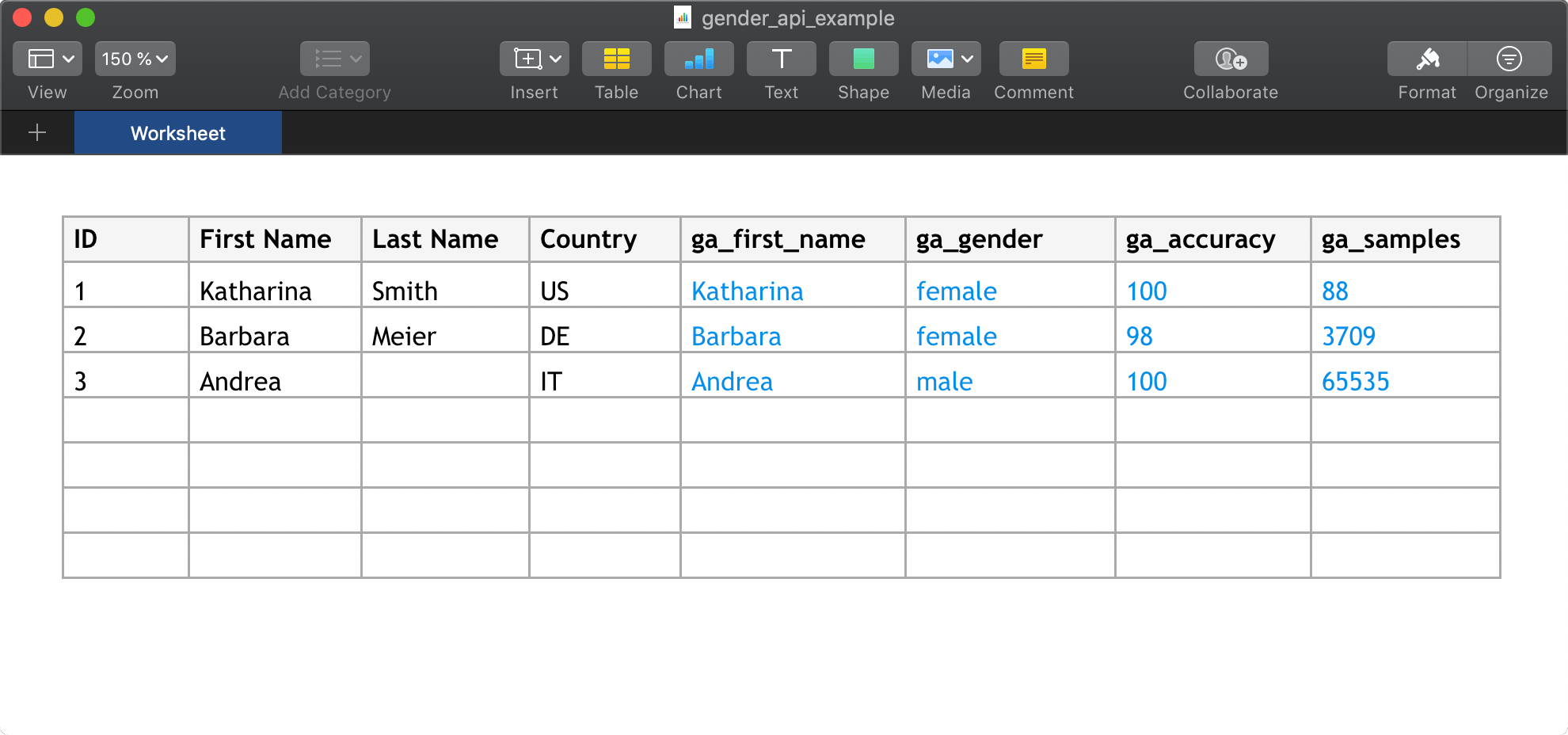
- Styles, number and date formats, formulas and merged cells are preserved — a date stays a date, and a formula is still a formula.
- Multi-sheet workbooks stay multi-sheet. The upload looks through every sheet, picks the first one with data, and lets you switch to another with a worksheet picker.
- The header row does not have to be row 1. It is detected, and if the detection is wrong you click the correct row in the preview grid.
- Free text above the table, a table starting in column C, sparse or duplicated column titles: all handled, because real exports look like that.
The columns added beside your data:
| Column | What is in it |
|---|---|
ga_gender |
The result. The labels are yours to choose — male/female/unknown, m/f, 1/2, or whatever your CRM already expects. |
ga_accuracy |
How one-sided the observed distribution is for this name, as a whole number from 0 to 100. (The API returns the same thing as a probability between 0 and 1.) Optional column. |
ga_samples |
How many observations that rests on. Optional column, and the one that makes the result auditable. |
ga_first_name |
The first name we actually resolved — useful when the input was a full name or an e-mail address. Optional column. |
The upload assistant, step by step. Try it with a file.
Why the sample count matters more at scale
On ten names you can eyeball the results. On a million you cannot, so the question becomes which rows you are willing to act on unchecked.
Because every row carries a probability and the number of observations behind it, you get to draw that line yourself. A common one: accept anything from ga_accuracy 90 upwards with a decent sample count, hold back the rest for a human or a neutral salutation. The alternative — one confidence level applied to your whole database, chosen by somebody else — is how a list ends up addressing people wrongly at scale.
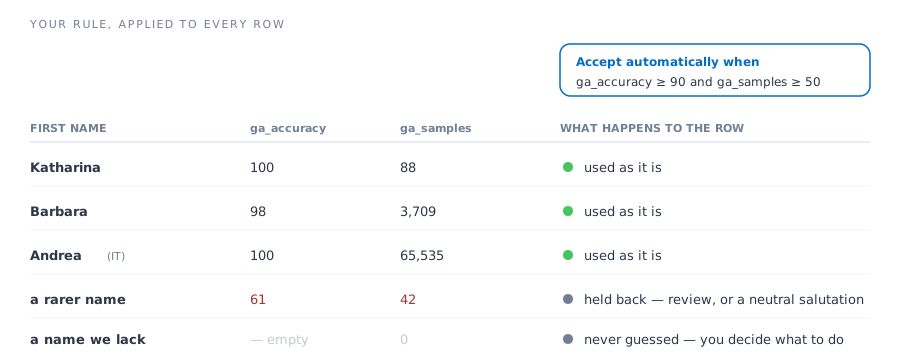
Names the database cannot resolve leave the gender column empty rather than filled with a guess. With 9,124,598 first names across 193 countries that is a small share of an ordinary list — but it is a share you get to see.
If your list spans several countries, say so — the same name is not the same gender everywhere, and we wrote that up separately.
Doing it in code
For continuous enrichment, the batch endpoint takes up to 100 names per request:
POST https://gender-api.com/v2/gender/by-first-name-multiple
[
    { "first_name": "Sandra", "country": "DE" },
    { "first_name": "Andrea", "country": "IT" }
]
Each entry answers independently, with its own probability, sample count and country — so a batch is genuinely a batch, not a single answer applied to several names.
- Official clients for PHP, Python, Node, Java, Go, Ruby, Rust, Perl and .NET.
- Full v2 reference, an OpenAPI description and a Postman collection.
- A prompt-ready implementation guide at /skill.md, if you would rather hand the job to a coding assistant.
- Working in a spreadsheet or a CRM instead? There are ready-made integrations for Excel, Google Sheets, Shopify, HubSpot, Salesforce, Zapier and more.
The procurement questions
A list of real customer names is personal data, and a large job usually needs signing off by somebody who will ask about exactly this:
- We are a German company; all servers are located in Germany and the data is processed inside the EU.
- Uploaded files are stored encrypted and deleted after ten days — earlier if you delete them yourself.
- A data-processing agreement can be requested in your account.
- Server logs contain the submitted name and are kept for 14 days, for accounting reasons.
- Every purchase produces a proper VAT invoice, and EU VAT IDs are handled correctly.
- Credits from one-off packages are valid for 12 months from your last purchase, and any new purchase extends all remaining credits, so a single large clean-up does not need a subscription.
The full picture is on the privacy overview.
Frequently asked questions
How many names can I process at once?
Up to 10,000,000 rows in a single CSV file, up to 300,000 rows in a single Excel workbook, and 100 names per request over the API — with no ceiling on how many requests you make. Larger than that, split the file or loop the API.
What does a large gender lookup job cost?
One lookup costs one credit, so the price is fixed before you start: the cheapest published package covering 500,000 names is €299 net. Above the largest published package it becomes a quote rather than a list price. You buy the credits up front, they are valid for 12 months from your last purchase (any new purchase extends all remaining credits), and every purchase produces a VAT invoice.
Do I need a developer?
No. Upload the file, point at the column that holds the first names, and download the finished file — no code involved. The API is there for the case where enrichment has to happen continuously rather than once.
Will my Excel file come back intact?
Yes. Styles, number and date formats, formulas, merged cells and every other worksheet stay as they were; the new columns are merged into your workbook rather than a fresh file being generated from your data.
What happens to rows the database cannot resolve?
The gender column stays empty and the sample count tells you why. Nothing is guessed to fill a gap, so you can filter those rows and decide what to do with them instead of discovering the guesses later.
Is a bulk upload GDPR compliant?
We are a German company, all servers are located in Germany and the data is processed inside the EU. Uploaded files are stored encrypted and deleted after ten days, and you can request a data-processing agreement in your account.
Can I try it before paying?
Yes — every account includes 100 free lookups per month, which is enough to run a sample of your own list and check the results before you buy credits for the whole file.
START WITH A SAMPLE OF YOUR OWN LIST
100 free lookups a month, no credit card — enough to run a slice of the real file and check the results before you buy for all of it.
Upload a CSV or Excel file · API documentation · Ask about a larger volume