






Split a full name into first and last name
One combined name field, one API call, two clean fields — with the particles, titles and reversed order that break a hand-written split already handled, and the gender in the same response.
The short answer
- Send the combined field, get back first_name and last_name — plus the gender, the accuracy and the sample count, in the same response, for one credit.
- Nobiliary particles ("van der", "von den", "de la") and academic and job titles are handled rather than tripped over — and a reversed "Rossi, Andrea" resolves too, from the name data rather than from the comma.
- Where both halves could be either, the decision comes from how often each part occurs as a first name against how often it occurs as a surname — not from its position in the string.
- Strict mode returns an empty last name instead of a guess when the surname is not in the database, so you can see the gap.
Why splitting on the space does not work
Almost every codebase has a version of this: take the name field, split on whitespace, first element is the first name, last element is the surname. It passes review because the test data is English, and it goes wrong quietly on the first customer who is not.
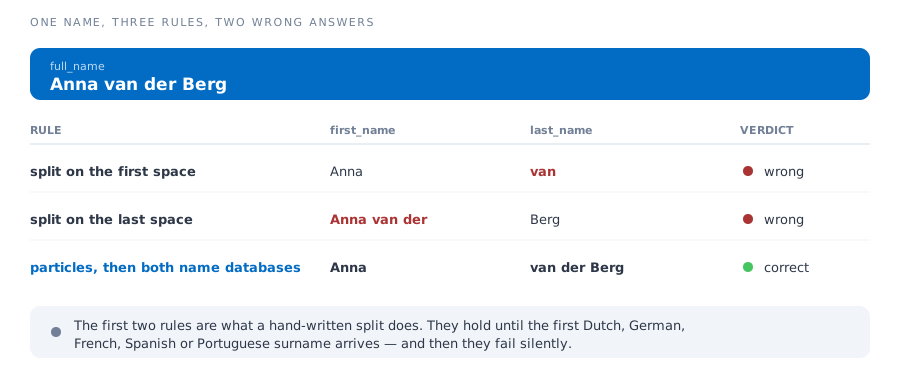
The failure mode is what makes it expensive. Nothing raises an exception. You get a database full of people whose surname is "van", a mail merge that greets them by it, and no log line pointing at the cause.
What decides the split
Four things, in order — and the last of them is the one a rule-based splitter cannot have, because it needs to know how names are actually distributed.
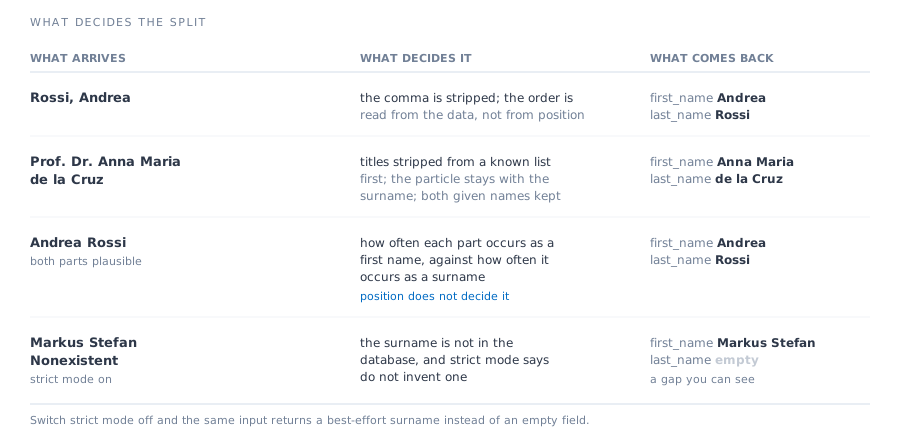
- Titles come off first. "Prof. Dr.", "Dipl.-Ing.", "Managing Director" and the rest of a maintained list are removed before anything else is decided, so they never end up in a name field.
- Particles stay with the surname. "van", "van der", "van den", "von", "von der", "de", "de la", "du", "le", "di", "des" and their neighbours are recognised as part of the surname they belong to.
- Punctuation is not trusted to carry the order. The comma in "Rossi, Andrea" is stripped along with the titles, and the order is then read from the name data — a comma is a formatting habit, and plenty of lists use it inconsistently. In the CSV and Excel upload you can state the column's order instead, and a stated order is used as stated.
- Ambiguity is settled by the data. Each candidate part is looked up in both the first-name and the last-name database, and the part that behaves far more like a surname than a first name is the surname.
Pass a country code and the same comparison happens against that country rather than against every country at once, which is what you want when you already know where the list came from.
How to call it
Two endpoints do this, and which one you want depends on whether you need strict mode.
v2 — the current API
POST https://gender-api.com/v2/gender/by-full-name
{ "full_name": "Anna van der Berg", "country": "NL" }
{
"result_found": true,
"first_name": "Anna",
"last_name": "van der Berg",
"gender": "female",
"probability": 0.98,
"details": { "credits_used": 1, "samples": 8961, "duration": "33ms" }
}v1 — when you need strict mode
Strict mode exists on the v1 split endpoint only. If an empty last name matters more to you than being on the newer API, use this one.
GET https://gender-api.com/get?split=Anna%20van%20der%20Berg&strict=true&key=…- v2 full-name reference — fields, errors, OpenAPI description.
- v1 split reference — the strict parameter and its exact responses.
- Official clients for PHP, Python, Node, Java, Go, Ruby, Rust, Perl and .NET.
First, is that column even full names?
Worth knowing before you process a file you did not create. Send a sample of up to 100 values and you get back whether they look like full names — and it costs no credits.
POST https://gender-api.com/v2/name-format-detect
{ "names": ["Sophie Jones", "Lorenzo Carlos", "Anna van der Berg"] }
{
"is_fullname": true,
"fullname_probability": 1,
"validHints": [ … ]
}Be clear about what this measures: fullname_probability is the share of the values you sent that consist of more than one word, and is_fullname is that share above 0.6. It is a judgement about the column, not about each name — which is exactly what you need when deciding whether to split at all, and not a substitute for the split itself.
A mixed column is a real answer too: some lists hold "Thomas" and "John Smith" side by side, and the split handles both without you sorting them first.
Where it still needs your help
A splitter that claimed to handle every name in the world would be lying. These are the cases where no rule resolves the string on its own.
If you control the form, the cheapest fix is not an API at all: two fields instead of one, or a hint that the format is "first name, last name". Everything below is what to do when you do not control it.
- Surname first. Whether or not a comma is there, the reading the name data supports wins over a rule about position — which is right far more often than it is wrong, but it is not a guarantee. If you know the whole column is surname-first, say so in the upload rather than relying on the punctuation.
- Single-word names. A mononym has no surname to find. The last name comes back empty rather than the first name being cut in half.
- Inconsistent transliteration. The same name spelled three ways across a list resolves as three names, because that is what it is in the data.
- Compound given names without a hyphen. "Anna Maria" is kept together where the data supports it, but a list mixing "Anna Maria Rossi" and "Anna Rossi" will not be uniform.
In all four, a country code narrows the problem, and strict mode makes the uncertain rows visible instead of quietly plausible. An empty field you can filter beats a wrong one you cannot spot.
A whole column at once
If the names are in a spreadsheet rather than an application, you do not need the API. Upload the file, point at the column that holds the combined names, and the split parts come back as new columns beside your data — up to 10,000,000 rows per CSV or 300,000 per Excel workbook, and your workbook returned intact.
- Upload a CSV or Excel file — no code, the original formatting preserved.
- Bulk gender lookup — the limits, the price at volume, and the procurement answers.
- Working in a spreadsheet or CRM? There are ready-made integrations for Excel, Google Sheets, Shopify, HubSpot, Salesforce, Zapier and more.
Frequently asked questions
Why not just split on the space?
Because the space is not the boundary. "Anna van der Berg" splits into a surname of "van" on the first space and a first name of "Anna van der" on the last one. Both are wrong, both look fine in a test with English names, and both fail silently the moment a Dutch, German, French, Spanish or Portuguese surname arrives.
What decides where the split goes?
Known titles are removed first, and nobiliary particles such as "van der", "von den" and "de la" are kept with the surname. After that, how often each part occurs as a first name is weighed against how often it occurs as a surname — so word position is not what decides it, and neither is punctuation: a comma is stripped along with the titles rather than read as a "surname first" marker. In the CSV and Excel upload you can state the column's order outright, and then it is used as stated.
What happens when the surname is not in the database?
That is what strict mode is for, on the v1 endpoint. With strict mode on, the last name comes back empty rather than guessed, so the gap is visible in your data. With it off, a best-effort surname is extracted anyway.
Does it also give me the gender?
Yes, in the same response and for the same one credit — along with the sample count and the accuracy behind it. Splitting the name and gendering it is one call, not two.
How do I know whether my column holds full names at all?
Send a sample of up to 100 values to the name-format-detect endpoint. It costs no credits and answers whether the column looks like full names, first names or a mixture — useful before you decide how to process the file.
What does splitting cost?
One credit per name, the same as a plain gender lookup, from €0.35 per 1,000. Credits are bought in advance and are valid for 12 months from your last purchase.
Will it handle names that are not Western?
Partly, and it is better to know where the edges are. Names written surname-first without a separator, single-word names, and names transliterated inconsistently are the hard cases — there is no rule that resolves them from the string alone. Sending a country code helps, because the lookup then weighs the parts against that country rather than against everything.
TRY IT ON THE NAMES THAT BREAK YOUR SPLIT
100 free lookups a month, no credit card. Take the twenty rows your current code gets wrong and start with those.